Quickstart
Get up and running with react-native-config-ultimate in 5 minutes.


Note: v0.2.0 is the first stable release. Versions
<0.2.0are deprecated.
Compatibility
| Library | React Native | React | Gradle | Architecture |
|---|---|---|---|---|
| 0.3.x | ≥ 0.73 | 18 / 19 | ≥ 7.4 | Old & New (TurboModules) |
| 0.2.x | ≥ 0.73 | 18 / 19 | ≥ 8 | Old & New (TurboModules) |
Supported Platforms:
- iOS — Native modules (Objective-C/Swift), Info.plist, Build Settings
- Android — Native modules (Java/Kotlin), BuildConfig, Manifest placeholders
- Web — Vite, Webpack, Rollup, Parcel (via React Native Web)
For advanced setup (multiple schemes, flavors, monorepos), see the Cookbook.
1. Install the package
# npm
npm install react-native-config-ultimate

# yarn
yarn add react-native-config-ultimate

# pnpm
pnpm add react-native-config-ultimate
2. Create your config file
Option A: .env (simple key=value)
echo "API_URL=https://api.myapp.com" > .env
Option B: .env.yaml (supports types and per-platform values) — Recommended
# .env.yaml
API_URL: https://api.myapp.com
DEBUG_MODE: true        # Typed as boolean
TIMEOUT_MS: 5000        # Typed as number

# Per-platform values
APP_STORE_URL:
  ios: https://apps.apple.com/app/myapp
  android: https://play.google.com/store/apps/details?id=com.myapp
  web: https://myapp.com
3. Update .gitignore
Add this to .gitignore (generated files should not be committed):
# react-native-config-ultimate
rncu.xcconfig
4. Generate config files
npx rncu .env
# or for YAML
npx rncu .env.yaml
This generates platform-specific files that native code reads at build time.
5. Configure iOS (one-time setup)
-
Run
pod installin theiosfolder:cd ios && pod install && cd .. -
Open the
.xcworkspacein Xcode - Drag
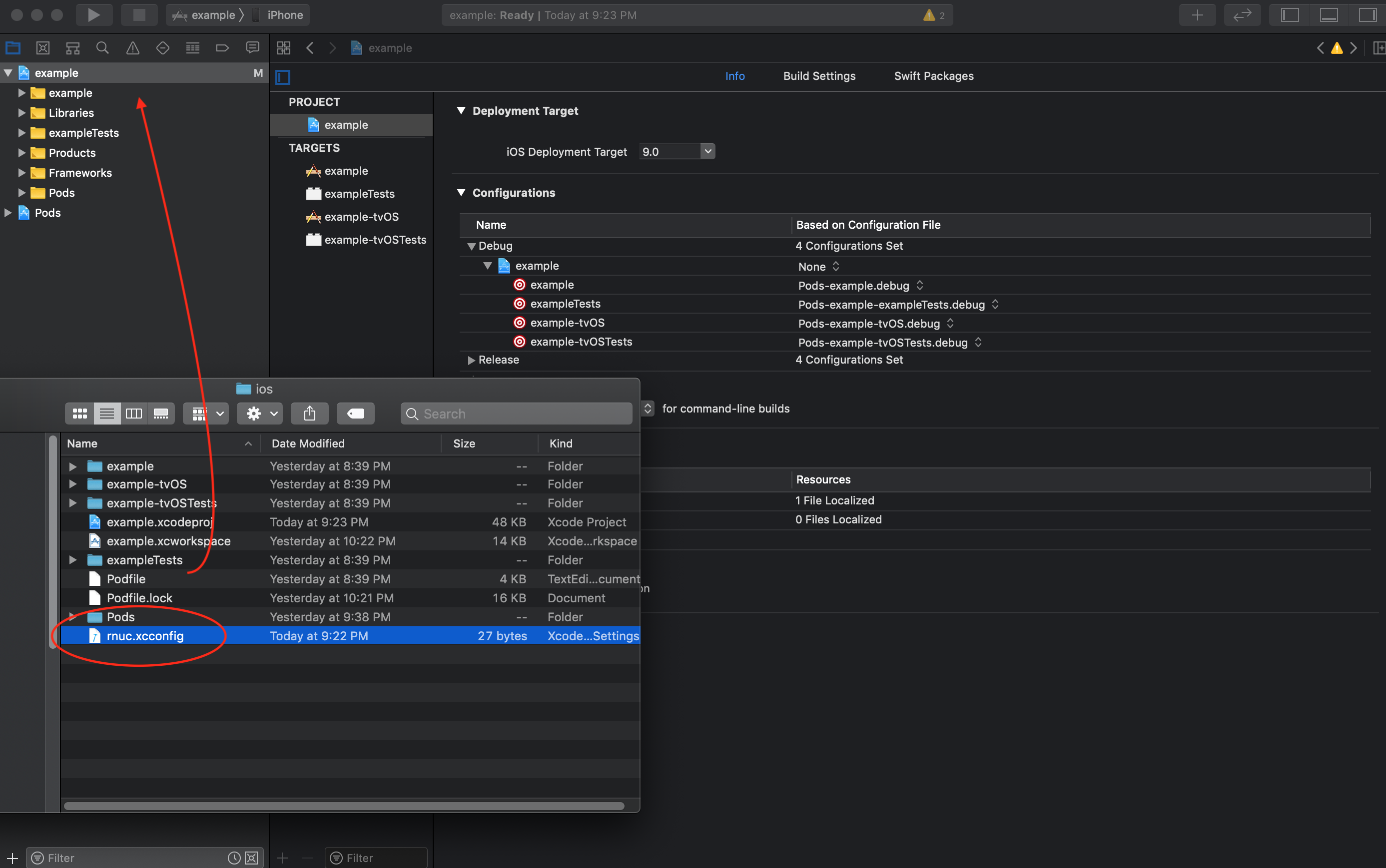
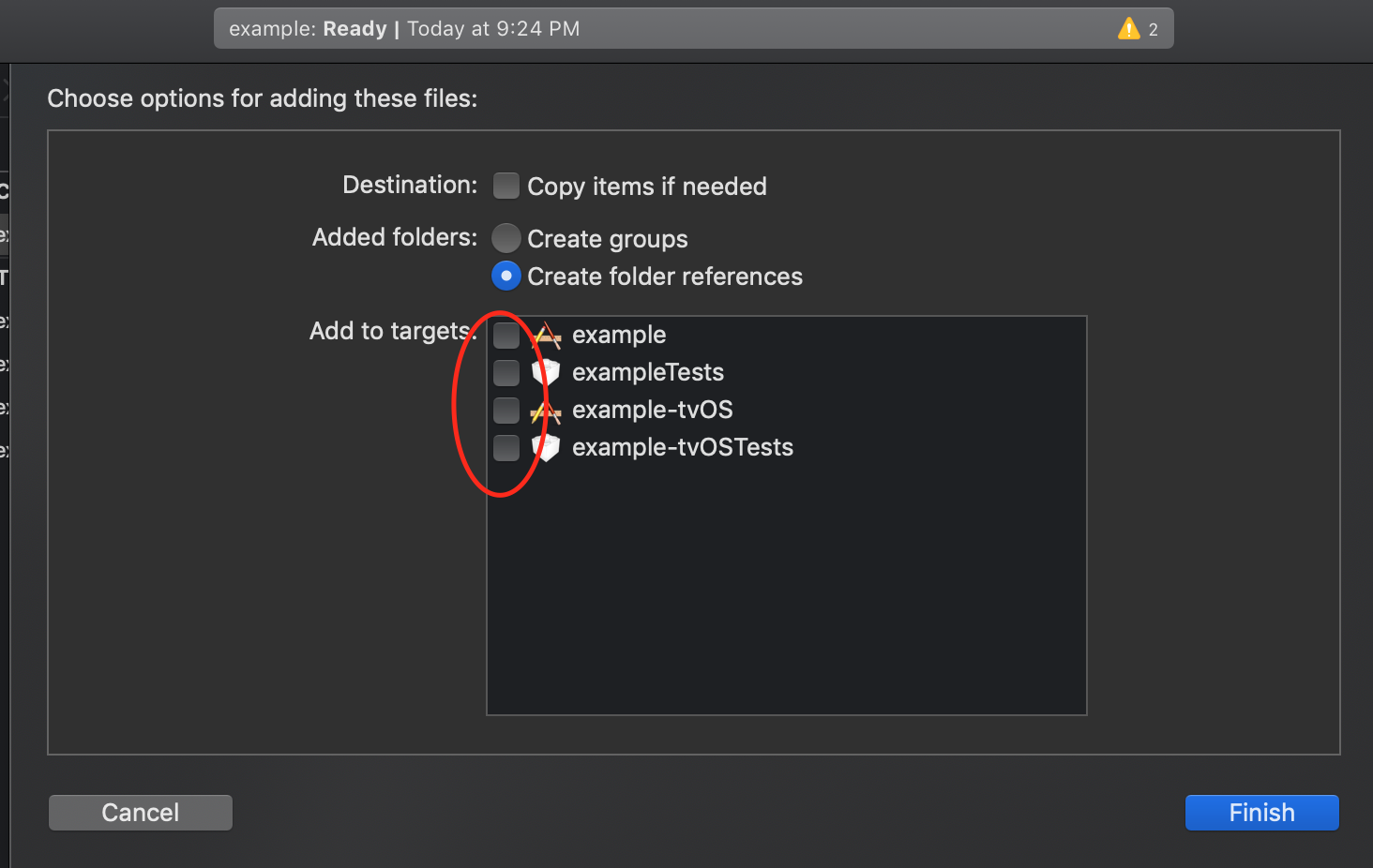
rncu.xcconfiginto your project:- Open Finder in
ios/ - Drag
rncu.xcconfiginto Xcode’s project navigator
- Open Finder in
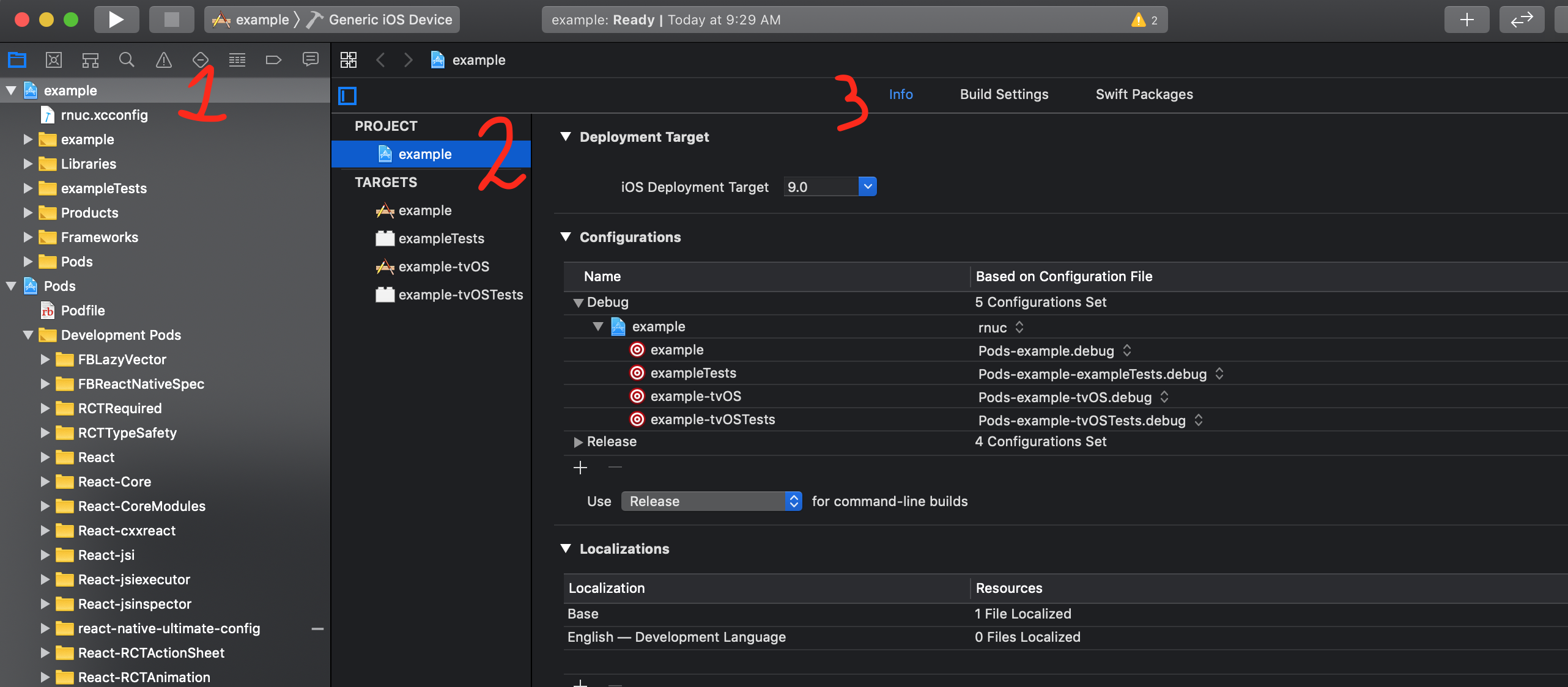
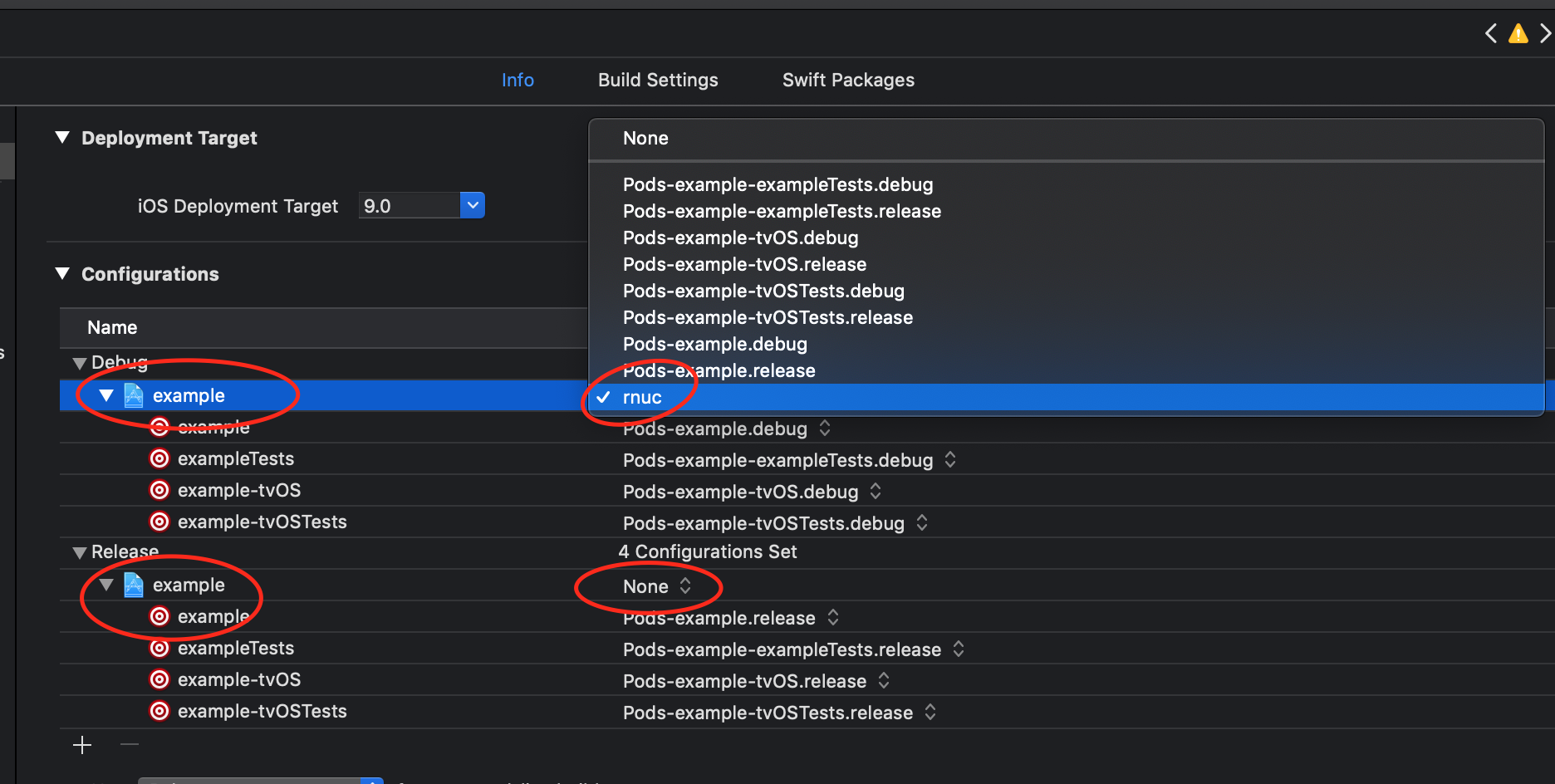
- Set
rncu.xcconfigas the base configuration:- Go to Project Settings → Info tab
- Under “Configurations”, set
rncufor both Debug and Release
Runtime sanity check: if
Config.MY_VARisundefinedat runtime and you see[UltimateConfig] No config values found…in the Xcode console, you skippednpx rncu <env-file>before building (or your.envwas empty). See troubleshooting → iOS: empty config at runtime.
6. Configure Android (one-time setup)
Prerequisites: Gradle 7.4+ required (0.3.0+). Check your version in
android/gradle/wrapper/gradle-wrapper.properties. See Migration Guide if you need to upgrade.
Step 1: Apply the Gradle plugin
Open android/app/build.gradle and add at the top of the file (before android {}):
apply from: project(':react-native-config-ultimate').projectDir.getPath() + "/rncu.gradle"
Monorepo/pnpm users: This
project(':...')form uses Gradle’s dependency resolution and works regardless of wherenode_moduleslives. See Monorepo Tips.
Fallback: If the above doesn’t work, use the relative path:
apply from: "../../node_modules/react-native-config-ultimate/android/rncu.gradle"
Step 2: Expose BuildConfig (required on both architectures)
Required on Old AND New Architecture. The native module cannot resolve your app’s
BuildConfigclass on its own — you must hand it the reference once at app start. Without this call,Config.MY_VARisundefinedat runtime and a warning is printed to logcat (UltimateConfig: setBuildConfig was never called…).
Kotlin — in MainApplication.kt:
import com.reactnativeultimateconfig.UltimateConfigModule

override fun onCreate() {
  super.onCreate()
  UltimateConfigModule.setBuildConfig(BuildConfig::class.java)
  // ... rest of onCreate
}
Java — in MainApplication.java:
import com.reactnativeultimateconfig.UltimateConfigModule;

@Override
public void onCreate() {
  super.onCreate();
  UltimateConfigModule.setBuildConfig(BuildConfig.class);
  // ... rest of onCreate
}
Step 3: ProGuard (release builds only)
If using ProGuard/R8, add to proguard-rules.pro:
-keepclassmembers class YOUR.PACKAGE.NAME.BuildConfig {
   public static <fields>;
}
Replace YOUR.PACKAGE.NAME with your actual package (e.g., com.myapp).
7. Configure Web (optional)
For React Native Web projects, the library provides a web-compatible export via the browser field in package.json.
| Bundler | Configuration | Notes |
|---|---|---|
| Vite | Works out of the box | Recommended for new projects |
| Webpack | Works out of the box | Target must include "web" |
| Rollup | browser: true in node-resolve |
Use @rollup/plugin-node-resolve |
| Parcel | Works out of the box |
Vite Example Setup
// vite.config.ts
import { defineConfig } from 'vite';
import react from '@vitejs/plugin-react';

export default defineConfig({
  plugins: [react()],
  resolve: {
    alias: {
      'react-native': 'react-native-web',
    },
  },
});
// Works in Web, iOS, and Android!
import Config from 'react-native-config-ultimate';
console.log(Config.API_URL);
8. Use in your app
JavaScript / TypeScript
// App.tsx
import Config from 'react-native-config-ultimate';
import { View, Text } from 'react-native';

function App() {
  return (
    <View>
      <Text>API: {Config.API_URL}</Text>
      <Text>Timeout: {Config.TIMEOUT_MS}ms</Text>
      {Config.DEBUG_MODE && <Text>Debug Mode Enabled</Text>}
    </View>
  );
}
TypeScript types are auto-generated from your .env or .env.yaml — no manual .d.ts files needed!
Native Code Access
The same values are available in native code:
iOS (Swift):
// Via Info.plist (see API docs for setup)
let apiUrl = Config.apiUrl
Android (Kotlin):
// Via BuildConfig
val apiUrl = BuildConfig.API_URL
See API Reference for complete native code examples.
Switching environments
On Android (0.3.0+), npx rncu is required before every build that uses a different env. Gradle verifies that your .env file hasn’t changed since the last CLI run. If you skip this step, the build fails immediately with an actionable error.
Workflow:
# 1. Pick your env and run the CLI
npx rncu .env.staging

# 2. Build Android
cd android && ./gradlew bundleRelease
If you edit .env.staging without re-running the CLI, Gradle will stop the build with:
Source env file(s) changed since the rncu CLI was last run:
  - .env.staging changed
Run:  npx rncu .env.staging
Then retry the Android build.
Other common invocations:
# Development
npx rncu .env.dev

# Production
npx rncu .env.prod

# Merge multiple files (later files override)
npx rncu .env.base .env.staging
Recommended package.json script — run the CLI automatically before every Android build:
{
  "scripts": {
    "preandroid": "rncu .env"
  }
}
After running rncu:
- JavaScript changes: Just reload the app
- Native changes (Info.plist, AndroidManifest): Rebuild required
- Android with config cache (
org.gradle.configuration-cache=true): No--no-configuration-cacheflag needed in 0.3.0+; the sidecar file is a tracked input that automatically invalidates the cache when env values change.
Watch mode
Auto-regenerate when your .env file changes:
npx rncu .env --watch
Next steps
- API Reference — Full CLI options, YAML features, schema validation
- Cookbook — App name, bundle ID, deep links, multiple schemes
- Testing — Mocking config in Jest tests
- Troubleshooting — Common issues and solutions