API Reference


Note: v0.2.0 is the first stable release. Versions
<0.2.0are deprecated.
This library supports both Old and New Architecture (TurboModules) with the same API. Works with React Native 0.73+ and React 18/19.
Table of Contents
Files
Environment data can be read from both dotenv and YAML files. The format is automatically detected by the CLI based on file extension: .yaml or .yml → YAML; anything else → dotenv.
Example of configuration in env file:
HELLO=world
TEST=100
Equivalent config with YAML:
HELLO: world
TEST: 100
Dotenv variable expansion
Variable references using $VAR syntax are automatically expanded in dotenv files:
BASE_URL=https://api.example.com
API_URL=$BASE_URL/v1
AUTH_URL=$BASE_URL/auth
This also works across files when merging multiple env files:
# .env.base
BASE_URL=https://api.example.com

# .env.staging
API_URL=$BASE_URL/v1   # → https://api.example.com/v1
Note: Variable expansion is only applied to dotenv-format files. YAML files use their own native anchor/alias syntax (
*anchor).
Per platform values
When using YAML it is possible to specify values per platform:
HELLO: world
TEST: 100
API_KEY:
  ios: abcdef
  android: tuvxyz
  web: 123456
☝ both keys must exist in the mapping
CLI
Inject environment data with a single command:
| npm | yarn |
|---|---|
npx rncu .env |
yarn rncu .env |
Multi-env file merging
Pass multiple env files to merge them. Files are processed left-to-right; the last file wins for any conflicting keys.
# Base config + environment-specific override
npx rncu .env.base .env.staging

# Base config + local secrets (gitignored)
npx rncu .env.base .env.local

# Three-level merge
npx rncu .env.base .env.staging .env.local
Example:
# .env.base
APP_NAME=MyApp
API_URL=https://api.example.com
DEBUG=false

# .env.staging
API_URL=https://staging.api.example.com
DEBUG=true
Result of rncu .env.base .env.staging:
APP_NAME=MyApp                           # from .env.base
API_URL=https://staging.api.example.com  # overridden by .env.staging
DEBUG=true                               # overridden by .env.staging
Tip: Add environment-specific files (
.env.staging,.env.prod) to git and keep.env.localin.gitignorefor local secrets.
Advanced options for monorepo
--project-root: path to the root of the project for which injection is performed--lib-root: path to where library is installed
Considering typical monorepo folder structure:
|-- package.json
|-- node_modules
    |-- react-native-config-ultimate
|-- packages
    |-- my_app
    |-- package1
    |-- package2
    |-- packageN
When injecting config for my_app the command should be:
yarn rncu --project-root . --lib-root ../../node_modules/react-native-config-ultimate .env
RC file
Hooks
When file .rncurc.js exists in project root it will be loaded when
rncu CLI is executed. A single function on_env will be invoked with env
data loaded from the file. Object returned from the function will be used
instead of original env data. When function returns undefined original data
will be used.
module.exports = {
  on_env: async function (env) {
    // this will be invoked with data of loaded env file
  },
};
Schema validation
Define a schema in .rncurc.js to validate env vars at build time. The build will fail with a clear error message listing all problems at once if any variable fails validation.
Validation runs after the on_env hook, so the hook can inject or transform variables before they are checked.
// .rncurc.js
module.exports = {
  schema: {
    // Required string
    API_KEY: { type: 'string', required: true },

    // Required number — fails if value cannot be parsed as a number
    TIMEOUT_MS: { type: 'number', required: true },

    // Optional boolean — accepted values: true/false/1/0 (case-insensitive)
    DEBUG: { type: 'boolean' },

    // String with regex pattern constraint
    ENV_NAME: {
      type: 'string',
      required: true,
      pattern: '^(dev|staging|prod)$',
    },
  },
};
When validation fails, the build exits with all errors listed at once:
❌ react-native-config-ultimate: env validation failed:
  • Missing required env var: API_KEY
  • TIMEOUT_MS must be a number, got "fast"
  • ENV_NAME does not match pattern /^(dev|staging|prod)$/, got "production"
Schema field options
| Field | Type | Description |
|---|---|---|
type |
'string' \| 'number' \| 'boolean' |
Expected type. All env values are strings by default; number and boolean validate parsability. |
required |
boolean |
If true, the build fails when the var is missing or empty. Default: false. |
pattern |
string |
A regex pattern the value must match (applied to the string representation). |
JS override
When rc file contains boolean field js_override react-native-config-ultimate will generate js code overriding values passed from native code. Scenarios why this may be needed
module.exports = {
  js_override: true,
};
New Architecture


react-native-config-ultimate supports both the Old Architecture (Bridge / NativeModules) and the New Architecture (TurboModules) with the same API. No configuration required — the library auto-detects which architecture is active.
| Architecture | React Native | React | How it works |
|---|---|---|---|
| Old (Bridge) | >=0.60 | 17/18 | NativeModules.UltimateConfig.getConstants() |
| New (TurboModules) | >=0.68 | 18/19 | TurboModule spec via Codegen |
The JS API is identical in both cases:
import Config from 'react-native-config-ultimate';

// Works on Old Architecture AND New Architecture
console.log(Config.MY_VAR);

// TypeScript knows the exact type from your .env.yaml
const timeout: number = Config.TIMEOUT_MS;
const debug: boolean = Config.DEBUG_MODE;
Javascript
Get your values in javascript!
// import module
import config from "react-native-config-ultimate";

// access variables
config.MY_CONFIG;
Typescript
index.d.ts is automatically generated by rncu with exact types derived from your env file. No manual type declarations needed.
// Generated index.d.ts (example)
export interface ConfigVariables {
  API_URL: string;
  TIMEOUT_MS: number;   // typed as number when using YAML
  DEBUG: boolean;       // typed as boolean when using YAML
}
declare const UltimateConfig: ConfigVariables;
export default UltimateConfig;
For dotenv files, all values are typed as string. For YAML files, the actual type (string, number, boolean) is inferred from the value.
iOS
Required setup (both Old and New Architecture): run
npx rncu <env-file>before each iOS build soConfigValues.his regenerated. Unlike Android, values are baked into a compiled header at build time, not read via reflection — so a stale or empty header means JS sees an empty config. A runtime warning ([UltimateConfig] No config values found…) is emitted from the native module if this happens. See troubleshooting → iOS: empty config at runtime.
Build Settings
All values from env file are exposed to Build Settings.
Info.plist
All values from env file are exposed to Build Settings and therefore automatically available in info plist.
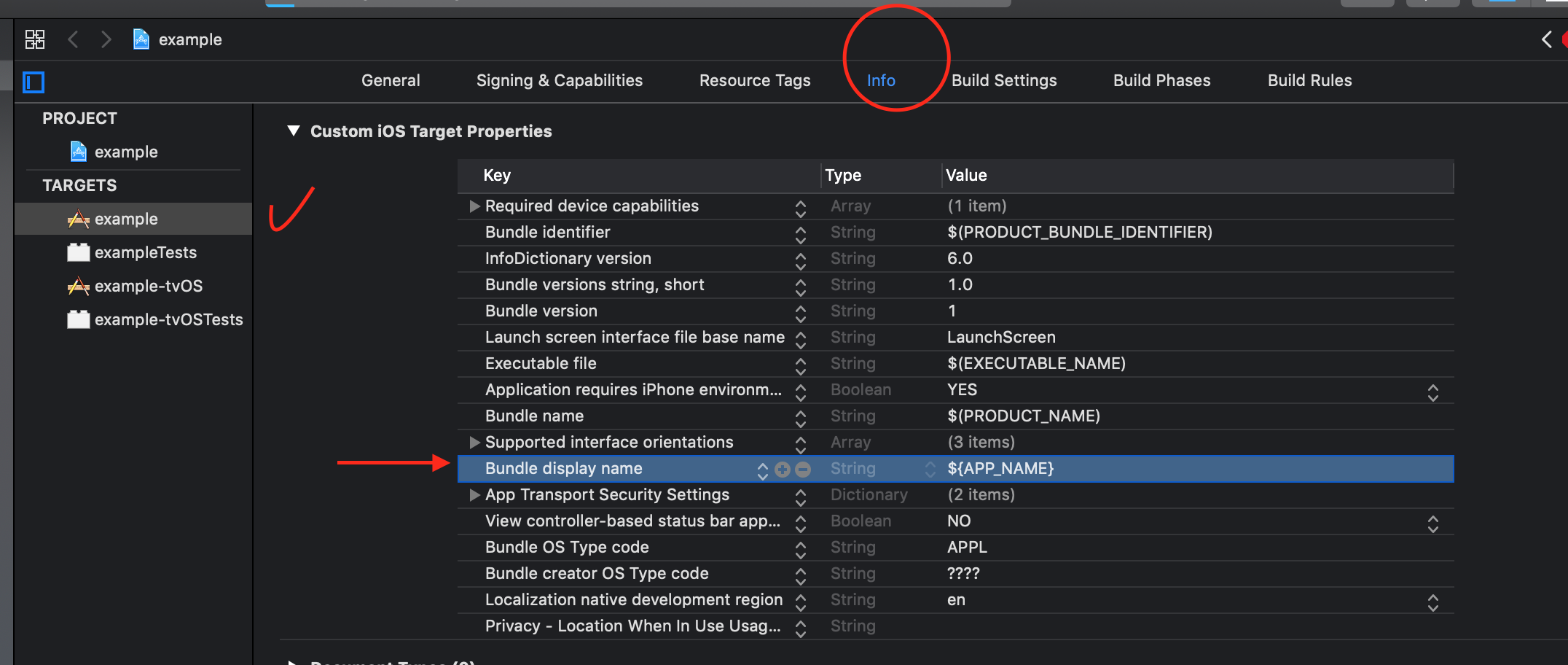
Example: set app name from config
env file:
APP_NAME=example
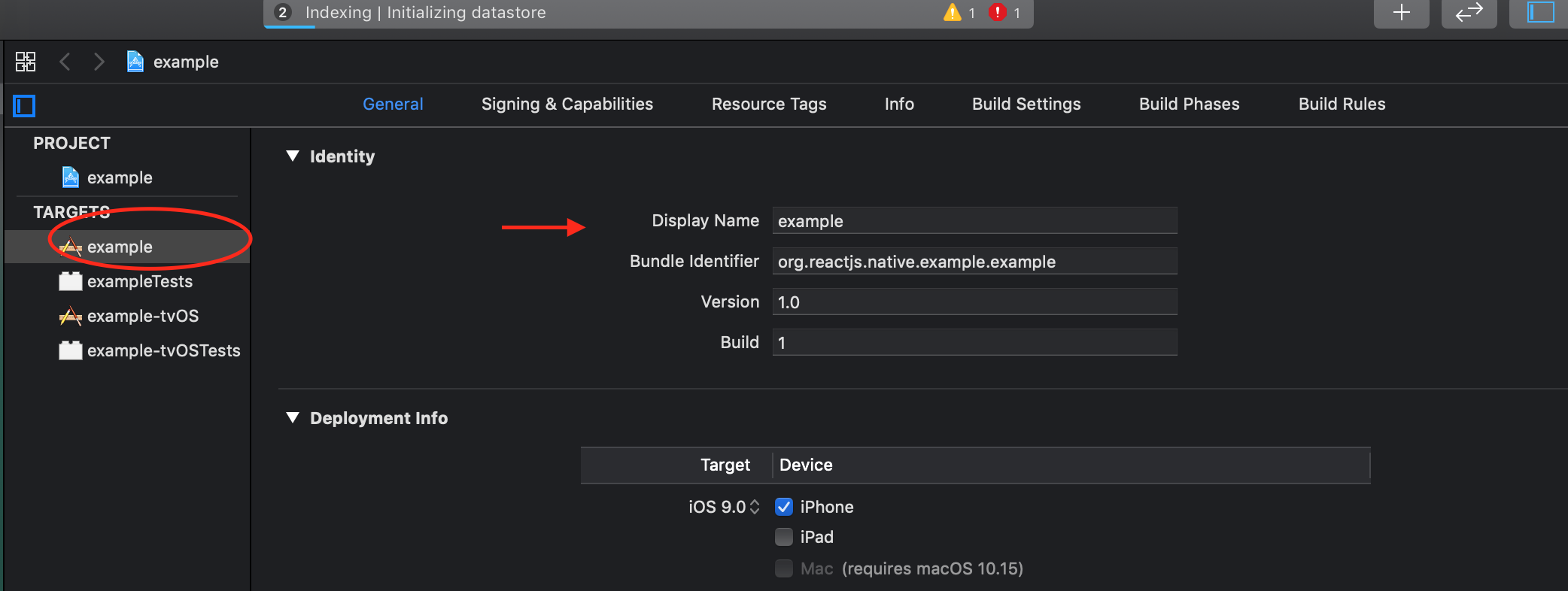
update info plist and observe app name changed:
Objective-C
#import <react-native-config-ultimate/ConfigValues.h>

// Access variables directly
NSLog(@"App name: %@", APP_NAME);
NSLog(@"API URL: %@", API_URL);

// Use in conditionals
if ([DEBUG isEqualToString:@"true"]) {
    NSLog(@"Debug mode enabled");
}
Swift
There are two distinct approaches depending on which React Native architecture your project uses. Check which option applies to you before reading further.
| Architecture | React Native | Approach |
|---|---|---|
| New Architecture (TurboModules) | ≥ 0.68 (default from 0.73) | Option 3 — Info.plist + Config.swift ✅ Recommended |
| Old Architecture (Bridge) | < 0.73 or newArchEnabled=false |
Option 1 or Option 2 |
Not sure which architecture you’re on? Check
android/gradle.propertiesfornewArchEnabled=true, orios/Podfileforfabric_enabled. If neither is set, you are on Old Architecture.
Option 1: Bridging Header (Old Arch only)
⚠️ Old Architecture only.
ConfigValues.his generated byrncuand exposes variables as Objective-C macros. This approach requires the RN bridge to be active and does not work with New Architecture (TurboModules / Fabric).
- Create or update your bridging header (
YourApp-Bridging-Header.h):
#import <react-native-config-ultimate/ConfigValues.h>
- Access values in Swift:
import Foundation

class MyService {
    func configure() {
        let appName = APP_NAME as String
        let apiUrl = API_URL as String
        configureNetwork(baseUrl: apiUrl)
    }
}
Option 2: Swift wrapper over ConfigValues.h (Old Arch only)
⚠️ Old Architecture only. Same constraint as Option 1 — requires the bridging header and the RN bridge.
// Config.swift
import Foundation

struct Config {
    static var appName: String { APP_NAME as String }
    static var apiUrl: String  { API_URL as String }
    static var debug: Bool     { (DEBUG as? String)?.lowercased() == "true" }
}

// Usage
let url = Config.apiUrl
if Config.debug { print("Debug mode") }
Option 3: Type-safe wrapper via Info.plist (New Arch + Old Arch)
Since all values are exposed to Build Settings, they flow through Info.plist into
Bundle.main at runtime — no bridging header needed. This is the recommended pattern
for Swift-only apps and React Native ≥ 0.73 projects using the New Architecture.
Step 1 — Add your variables to Info.plist:
<!-- ios/YourApp/Info.plist -->
<key>API_URL</key>
<string>$(API_URL)</string>
<key>APP_NAME</key>
<string>$(APP_NAME)</string>
Xcode expands $(API_URL) at build time using the value injected by rncu.xcconfig.
Step 2 — Create Config.swift:
// ios/YourApp/Config.swift
import Foundation

/// Type-safe access to environment variables defined in `.env`.
///
/// Values are injected at build time by `react-native-config-ultimate` via `rncu.xcconfig`.
/// Each variable is resolved through `Info.plist` using Xcode's `$(KEY)` build setting expansion.
///
/// Usage:
/// ```swift
/// let url = Config.apiUrl
/// ```
///
/// **Workflow when adding a new variable:**
/// 1. Add the key to `.env`
/// 2. Run `npx rncu .env` (or `yarn rncu .env`) to regenerate `rncu.xcconfig`
/// 3. Add `<key>YOUR_KEY</key><string>$(YOUR_KEY)</string>` to `Info.plist`
/// 4. Add a static property here: `static let yourKey: String = value(for: "YOUR_KEY")`
enum Config {
    static let apiUrl: String  = value(for: "API_URL")
    static let appName: String = value(for: "APP_NAME")
}

// MARK: - Private

private func value(for key: String) -> String {
    guard
        let raw = Bundle.main.object(forInfoDictionaryKey: key) as? String,
        !raw.isEmpty
    else {
        fatalError("""
            [Config] Missing or empty value for key '\(key)'.
            → Did you run `npx rncu .env`?
            → Is '\(key)' added to Info.plist as <string>$(\(key))</string>?
            """)
    }
    return raw
}
Step 3 — Register Config.swift in Xcode:
Add the file to your Xcode project so it is compiled as part of the app target (drag-and-drop into the project navigator, or add it via File → Add Files to…). Make sure the target membership checkbox is ticked.
Usage:
// Anywhere in your native Swift code
print(Config.apiUrl)   // → "https://api.example.com"
print(Config.appName)  // → "MyApp"
Why
fatalErrorinstead of a default? A missing config value is always a developer mistake (forgot to runrncu, forgot to add the key toInfo.plist). Crashing fast at launch with a clear message is far better than silently using an empty string that causes subtle bugs in production.
Why
enuminstead ofstruct? Anenumwith no cases cannot be instantiated, making it a natural namespace for static constants — the Swift equivalent of a pure-static utility class.
Android
The Gradle plugin injects environment variables as:
BuildConfigentries- string resources
project.ext.envofbuild.gradle
Required setup (both Old and New Architecture): call
UltimateConfigModule.setBuildConfig(BuildConfig::class.java)once fromMainApplication.onCreate(). Without it the native module returns an empty config at runtime. See troubleshooting → Android: setBuildConfig not called.
build.gradle
you can access config variables with simple
project.config.get("APP_NAME")
AndroidManifest.xml
All values from environment are made available as resources and manifest placeholders
They are accessible as:
a string resource
      <activity
        ...
        android:label="@string/APP_NAME"
        />
        ...
      </activity>
a placeholder variable
      <activity
        ...
        android:label="${APP_NAME}"
        />
        ...
      </activity>
Java
All variables are exposed via BuildConfig. They are accessible as:
package com.example;

import android.os.Bundle;
import android.util.Log;
import com.facebook.react.ReactActivity;

public class MainActivity extends ReactActivity {

  @Override
  protected String getMainComponentName() {
    return "example";
  }

  @Override
  public void onCreate(Bundle savedInstanceState) {
    super.onCreate(savedInstanceState);

    // Access config values
    Log.d("Config", "App name: " + BuildConfig.APP_NAME);
    Log.d("Config", "API URL: " + BuildConfig.API_URL);

    // Use in conditionals
    if (BuildConfig.DEBUG) {
      Log.d("Config", "Debug mode enabled");
    }
  }
}
Kotlin
All variables are exposed via BuildConfig and can be accessed directly in Kotlin:
package com.example

import android.os.Bundle
import android.util.Log
import com.facebook.react.ReactActivity

class MainActivity : ReactActivity() {

    override fun getMainComponentName(): String = "example"

    override fun onCreate(savedInstanceState: Bundle?) {
        super.onCreate(savedInstanceState)

        // Access config values
        Log.d("Config", "App name: ${BuildConfig.APP_NAME}")
        Log.d("Config", "API URL: ${BuildConfig.API_URL}")

        // Use in conditionals
        if (BuildConfig.DEBUG) {
            Log.d("Config", "Debug mode enabled")
        }
    }
}
Type-safe Kotlin wrapper (Optional)
Create a type-safe wrapper for cleaner access:
// Config.kt
package com.example

object Config {
    val appName: String
        get() = BuildConfig.APP_NAME

    val apiUrl: String
        get() = BuildConfig.API_URL

    val debug: Boolean
        get() = BuildConfig.DEBUG

    val timeoutMs: Int
        get() = BuildConfig.TIMEOUT_MS.toIntOrNull() ?: 5000
}

// Usage
class MyService {
    fun configure() {
        val url = Config.apiUrl

        if (Config.debug) {
            Log.d("MyService", "Debug mode - using $url")
        }
    }
}
Access in Jetpack Compose
@Composable
fun AppInfo() {
    Column {
        Text(text = "App: ${BuildConfig.APP_NAME}")
        Text(text = "Version: ${BuildConfig.VERSION_NAME}")

        if (BuildConfig.DEBUG) {
            Text(
                text = "Debug Mode",
                color = Color.Red
            )
        }
    }
}
Web
The library provides full web support via React Native Web. Variables are exported as an object:
// Works in Vite, Webpack, Rollup, Parcel
import Config from 'react-native-config-ultimate';

console.log(Config.API_URL);
console.log(Config.TIMEOUT_MS);
Bundler Compatibility
| Bundler | Support | Notes |
|---|---|---|
| Vite | ✅ | Works out of the box — recommended |
| Webpack | ✅ | Ensure target includes "web" |
| Rollup | ✅ | Use @rollup/plugin-node-resolve with browser: true |
| Parcel | ✅ | Works out of the box |
Vite Configuration Example
// vite.config.ts
import { defineConfig } from 'vite';
import react from '@vitejs/plugin-react';

export default defineConfig({
  plugins: [react()],
  resolve: {
    alias: {
      'react-native': 'react-native-web',
    },
  },
});
Per-Platform Web Values
Use YAML to specify web-specific values:
# .env.yaml
API_ENDPOINT:
  ios: https://ios.api.example.com
  android: https://android.api.example.com
  web: https://web.api.example.com
This functionality relies on the package.json browser field. See the quickstart guide for detailed setup.
Note about types
If yaml file is used for configuration then it is possible to pick up types of variables, however not every place can deal with all types or deal with types at all. Please consult with the following table to know what’s available:
| place | types available | notes |
|---|---|---|
| javascript | yes | - |
| infoplist | no | all values are strings |
| objective-c | yes | - |
| swift | yes | Old Arch: via bridging header (ConfigValues.h). Any arch: via Info.plist + Bundle.main (see Swift section) |
| build.gradle | yes | - |
| AndroidManifest.xml | yes* | floating point values are available as @string resources since there are no such type available in resources: https://developer.android.com/guide/topics/resources/available-resources |
| Java | yes | - |
| Kotlin | yes | same as Java, via BuildConfig |
Related
- Quickstart — Installation and setup
- Cookbook — Common patterns and recipes
- Troubleshooting — Common issues and solutions